In Journey Builder, what is the difference between Journey Data and Contact Data?

In short, Journey Builder takes a snapshot of your data extension when records are injected into your journey — this is Journey Data.
Contact Data, on the other hand, is the “live” data in your data extension. Contact Data is best used for data that can be changed mid-flight of a journey.
More on both Journey Data and Contact Data below.
Journey Data
Journey Data preserves the state of the data at the moment your subscriber enters the journey. As mentioned earlier, it is a snapshot of the data at that specific time it is entered into the journey. Any data that is changed while that record is in the journey will not be evaluated with the new update.
For example, suppose you have a subscriber that enters a journey and they wait 3 days until they reach the first decision split:

Let’s pretend we have one subscriber in the journey data extension for simplicity sake:
| EmailAddress | Flag |
| jockson@ampscript.com | True |
When using Journey Data, since the Flag attribute is set to “True” at the time of journey injection, it will evaluate “True” on the first Decision Split regardless if the value changes. The snapshot is taken with the value set as “True, ” so even if this boolean value changes to false while it is waiting in the 3 day Wait Step, this subscriber will still evaluate as “True” in the Decision Split. See steps below:
- The email address jackson@ampscript.com is injected into the journey. His data has a Flag boolean field set to True.
- The first step in the journey is to wait 3 days. On day 2, the value of the Flag boolean changes from True to False in the data extension
- After the third day, the subscriber moves on to the Decision Split. The Decision Split evaluates the data and even though it shows False in the data extension, Journey Builder took a snapshot of the data as True so the subscriber goes down the True (top) path.
Contact Data
Contact Data, on the other hand, is updated as the journey goes on. In other words, it is the most recent data that is reflected in your data extension. Any data that is changed in the data extension can be used to evaluate in Decision Splits.
Using the same example above, even if the Flag attribute is set at “True” at the time of journey injection, the decision split will take whatever value it is by the time it reaches the Decision Split. So in the case above, if the value changes from “True” to “False”, the subscriber will evaluate as “False” even if the value was “True” at the time of entering the journey. Let’s review the same steps above but with Contact Data:
- The email address jackson@ampscript.com is injected into the journey. His data has a Flag boolean field set to True. (Exactly the same as above)
- The first step in the journey is to wait 3 days. On day 2, the value of the Flag boolean changes from True to False in the data extension. (Still exactly the same as above)
- After the third day, the subscriber moves on to the Decision Split. The Decision Split evaluates the data and now that it shows False in the data extension, Journey Builder will evaluate the data as False so the subscriber goes down the False (remainder) path.
When to use Journey Data and when to use Contact Data
If you have a simple journey that has a few emails and wait steps in between then Journey Data is sufficient. Or if you want to preserve the data at the time of entry, such as last purchase or specific subscriber attributes that qualifies them to enter the journey.
For example, if the subscriber qualifies to enter the journey if they have purchased a shirt before, you may send them an email about matching pants. Even if that data later changes, you still want to send them that second email.
If you need to evaluate data that can be changed mid-journey and the data evaluated needs to be the most up-to-date data then use Contact Data. An example use-case could be something like:
- You have a preference page CloudPage that can update a field that’s used in the journey.
- For example, if you want to evaluate real-time preference updates and change the journey path based on that value
- If you’re connecting to Sales or Service Cloud data and have an automation that is updating the data being used in the journey.
- An import file from your data warehouse updates most up-to-date data and it needs to be evaluated in the journey with most recent data
How to Add Contact Data
Contact Data is created as an Attribute Group in Contact Builder.
- In Contact Builder and under Data Designer, click the blue Create Attribute Group button on the top-right hand corner.
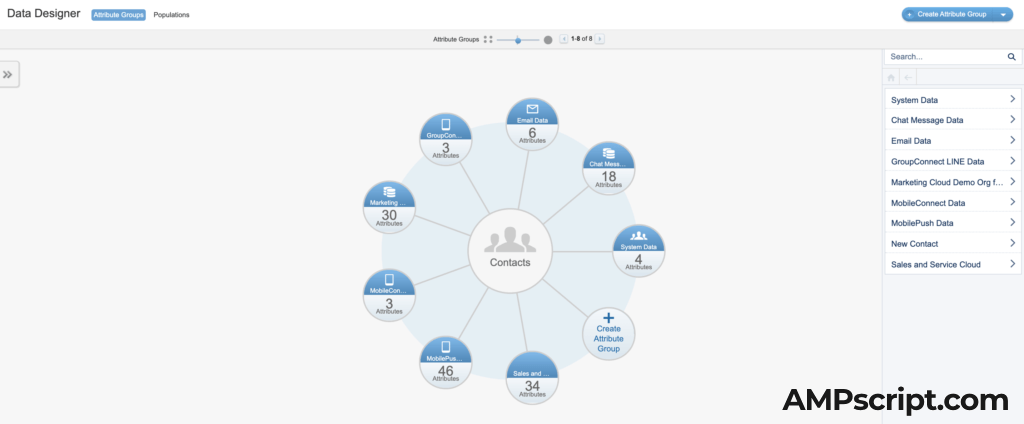
2. Next, name the Attribute Group and select the Icon. Click the Create button.

3. Create a new data extension or link the data extension that you’re using as your sendable Journey data extension

4. Link your Contact Key to your SubscriberKey in your data extension. Verify the update.
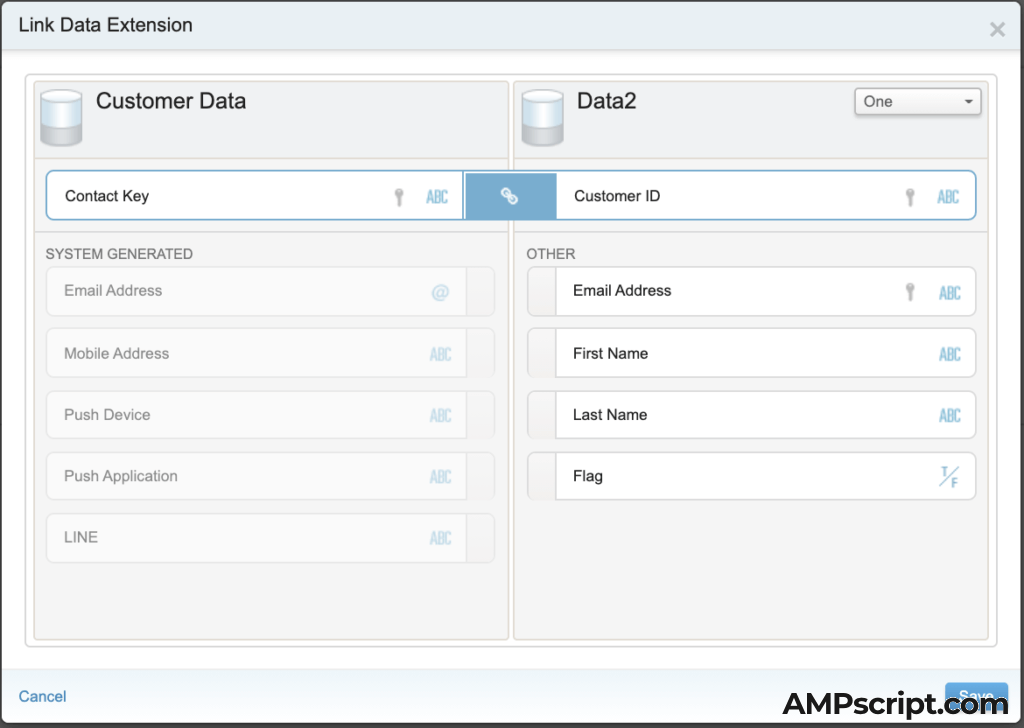

5. Go back to your journey and in a Decision Split, you’ll be able to see that Attribute Group you just created. You may need to click out of Journey Builder and back in to see the updated list in Contact Data.

Journey Data is automatically added depending what you use for the Entry Event. If a data extension is selected, then your data extension will be your Journey Data.
Let me know if you have any questions in the comments below with the difference with Journey Data and Contact Data and I’ll try my best to respond right away.

Hey Jackson,
Thanks for the helpful breakdown. Great post.
Thank you. Let me know if there’s anything else I can further explain.
Hi Jackson,
This is a great post. Explained in simple words and real effective for someone like me.. who has just started to learn!
Thank you! Doing what I can to help
i need salesforce marketing cloud Scenario based interview questions
These should help you: https://ampscript.com/salesforce-marketing-cloud-certifications/
Thank you. Good explanation. I wish, You will continue posting such a great content like this.
Thank you. I will try to keep posting more explanations.
Does ampscript in either edm’s or SMS use journey or contact data?
I have an appointment value that can be updated during the journey, but in my last test the original appointment time at the time of injection was displayed and not the new appointment date.
It uses real-time value of what is in the data extension — assuming that you’re using a lookup or lookup rows in the email content
What if you’re using AttributeValue() to call the data? Can it be changed mid-journey and reflect in later deployments? Or does it have to be a lookup?
That should be just AMPscript within the content and can be reflected in real-time based on the sendable data extension.
Is it possible to retrieve the snapshot of the journey data via SQL or automation studio?
The journey data would just be what is in your journey entry data extension. I’m assuming you’re saying the value has changed since entering the journey? You would need to add update activities in the journey to update the data extension.
I have a question if you use journey data and you do several emails during the journey with waiting and other activities like path optimation, and it turns out that in the first email you send to the subscriber he unsubscribes and sets the consent to false…. the subscriber’s status would not be updated, since the data is not updated when we use journey data, then you would be impacting a contact that during the first email of that journey no longer wants to receive further communications….
In this case you should use contact data when you want to create a campaign with many commercial emails, since you could change the subscriber’s status and in this way it would be updated immediately in the journey?
Thank you very much for the post in advance
If a subscriber’s status is updated in All Subscribers as ‘unsubscribed’ then that subscriber would get kicked out of the journey and not receive any more emails regardless of if you use Contact or Journey Data. However, if you have some sort of custom preferences inside a master data extension, you could use an Exit Criteria to remove that person based on the data attribute values in that master data extension.
I have understood the difference between contact data and journey data.
Thank you so much for the explanation.
But I have one query here.. As you said, in order to use contact data, we need to create attribute group in contact builder. But without creating that, if we directly use the contact data option, and using the fields from there is it will take the most recent data from data extension? because I can see the same fields in contact data as well as journey data.
You may be using some data extensions that have already been added perhaps standard ones.
Can we use the different data extensions in the same journey builder? Like for example: I have 3 DE’s say test1, test2, test3.
I am using test1 as data source in the journey and i am sending a email to the contacts which are present in test1 DE. But in the decision split i would like to use test2 and test3 records further. If I create a attribute group for them and using those from the contact data, is that good to do that? and can we expect the results?
You can, but you must maintain parity between the three data extensions. For example, if you user1 in test1, but this record does not exist in test2 and test3, you may have a problem when trying to evaluate that decision split.
Great Post
Thank you!
I already have Attribute group and is comparing contact id in contact data with contact id in journey data and this works. I also have a flag which I want to use which is not part of contact but child object has flag and if that flag is false then it should exit the journey. How can this be achieved?
The “child” data extension would need to be added as an attribute group.
I have read so many blogs for this difference, This is explained in simple way and putting the screenshot’s have added an advantage
Thank you for your comment!